
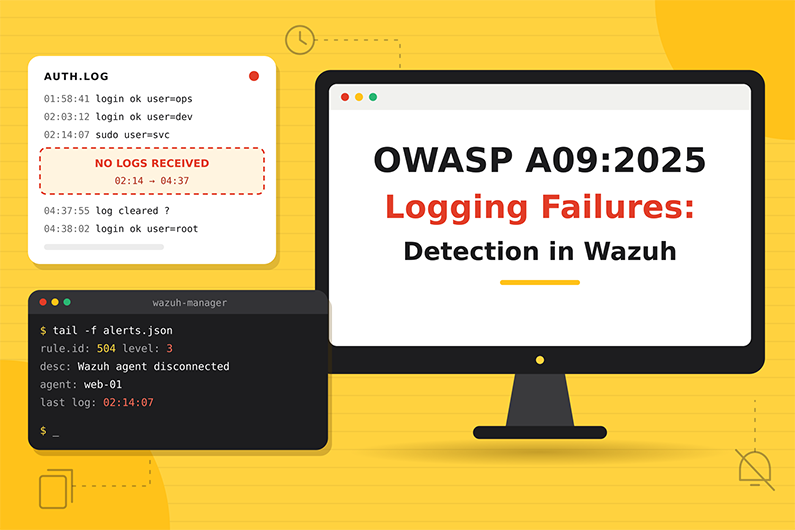
Security Logging and Alerting Failures (OWASP A09:2025): Detecting Log Tampering and Visibility Gaps with Wazuh
Security logging and alerting failures are A09 in the OWASP Top 10:2025. They happen when important events are not logged, logs are not protected, or nothing turns them into timely alerts. OWASP renamed the category from “Monitoring” to “Alerting” in 2025 to stress that logs only help when they lead to action.
This category is different from the others because it rarely describes a single attack. It is the weakness that lets other attacks continue unnoticed, and it also covers attackers who deliberately remove visibility by clearing logs or stopping agents. This article explains both patterns, how to detect log tampering with built in and custom Wazuh rules, how to find gaps in your own monitoring, and how a SOC investigates a hypothetical silent log source that hid a credential stuffing attack.
This guide is part of the series OWASP Top 10 for SOC Analysts: Web Attack Detection and Investigation with Wazuh. For HTTP basics, how to read access logs and how Wazuh decodes web logs, see the web attack fundamentals in that guide. The official OWASP description of this category is at OWASP A09:2025 Security Logging & Alerting Failures.
Table of Contents
- What Are Security Logging and Alerting Failures?
- How Attackers Exploit Missing Visibility
- Logging and Alerting Failure Examples
- Log Tampering Indicators and Evidence
- How to Detect Log Tampering and Visibility Gaps with Wazuh
- Practical SOC Investigation Scenario: A Silent Log Source Hides Credential Stuffing
- Incident Response Process
- Prevention and Remediation
- Related OWASP Categories
- Frequently Asked Questions
- Conclusion
- Continue the OWASP Top 10 Series
- References and Further Reading
What Are Security Logging and Alerting Failures?
Definition: Security Logging and Alerting Failures happen when an application or its environment does not record important security events, does not protect those records, or does not turn them into timely alerts, so attacks are not detected, not investigated, or detected far too late.
Key terms:
- Auditable event: An event that must be recorded, such as login success and failure, access control failure, admin action or payment.
- Log integrity: Protection against deleting or editing logs.
- Centralized logging: Sending logs off the host to a SIEM so local deletion does not erase evidence.
- Retention: How long logs are kept.
- Alerting threshold and use case: The defined condition that should create an alert, and the scenario it covers.
- Playbook: The documented steps to handle a type of alert.
- Log injection (
CWE-117): Attacker input that adds fake lines to logs, for example with newline characters. - Sensitive data in logs (
CWE-532): Passwords, tokens or personal data written to logs. - Insufficient logging (
CWE-778): Important events are not logged at all. - Alert fatigue: Too many false positives, so real alerts are missed.
What weakness it represents: OWASP says this category is hard to test and under represented in CVE data (only 723 CVEs), but very impactful for visibility, alerting and forensics. The name changed in 2025 to emphasize alerting, because logs alone do not cause action.
OWASP lists, among others, these failure situations:
- Logins, failed logins and high value transactions are not logged, or logged inconsistently (for example only successful logins).
- Warnings and errors create no or unclear log messages.
- Log integrity is not protected.
- Application and API logs are not monitored.
- Logs are only stored locally and not backed up.
- Alert thresholds and escalation processes are missing or ineffective.
- Penetration tests and DAST scans (for example Burp or ZAP) do not trigger alerts.
- Logs contain sensitive data, or log data is not encoded, enabling log injection.
- Too many false positives overload the SOC.
- Playbooks are missing or outdated.
Why it happens: Logging is treated as a developer debugging tool, not a security control. Nobody defines security use cases. Logs are not forwarded to the SIEM. Storage costs lead to short retention. Rules are never tested.
Why attackers target it: Attackers prefer environments where they will not be seen. They may also delete logs, stop agents or flood alerts to hide their activity.
What can happen: Breaches continue for months or years. OWASP’s examples include a health plan provider whose breach of children’s records may have lasted more than seven years without detection, and an airline breach discovered only when a third party hosting provider reported it.
Business assets affected: Every asset, indirectly. Also regulatory standing, because many laws require the ability to detect and report breaches.
How Attackers Exploit Missing Visibility
This category is a weakness that helps other attacks succeed. It is not usually a single attack technique. There are two patterns:
Pattern 1: Exploiting absent visibility
- Attacker needs: Any attack path into an application that is not logged or not monitored.
- Target: Systems or events without logs, such as an API with no auth logs.
- Attacker actions: Performs the attack normally.
- Vulnerable environment: Records nothing, or records it but never alerts.
- Result: The attack succeeds and persists. The organization learns about it from customers, partners or the press.
- Evidence: Missing. The investigation finds gaps instead of evidence.
Pattern 2: Actively removing visibility (defense evasion)
- Attacker needs: Access to a host with enough privilege.
- Target: Log files, logging services, the SIEM agent, audit policy.
- Attacker actions: Deletes or truncates logs, clears Windows event logs, stops the agent, changes audit policy, or injects fake log lines.
- Vulnerable environment: Allows it without alerting, and keeps logs only locally.
- Result: Evidence is lost and later activity is invisible.
- Evidence left: Log truncation events, event log cleared events, agent disconnection, audit policy change events, sudden drop in event volume. MITRE ATT&CK calls these techniques Indicator Removal (
T1070) and Impair Defenses (T1562).
Logging and Alerting Failure Examples
Example 1: Attacker clears logs on a compromised web server
- Situation: An attacker has a shell on a Linux web server through a web shell.
- Attacker objective: Remove traces of the web shell requests.
- Attacker actions: Truncates the access log.
# Representative attacker command (for recognition only)
: > /var/log/nginx/access.log
- Vulnerable environment: If the log is only on the server and nobody monitors it, the evidence is gone.
- With Wazuh: The agent had already forwarded earlier lines to the manager, so the evidence remains in the SIEM. Built in rule 592 “Log file size reduced.” (level 8) fires because the file shrank. On Windows, clearing the Security log creates Event ID 1102, which built in rule 63103 “The audit log was cleared” (level 5) detects when the agent reads the Security channel with the
eventchannelformat. - Attempt versus success: Truncation is a successful anti forensics action on the host, but it fails as evasion if logs were already centralized.
- Impact: Loss of local evidence; the incident becomes harder to scope if logs were not forwarded.
Example 2: Application never logs failed logins (from OWASP’s description)
- Situation: A partner portal logs only successful logins.
- Attacker objective: Guess partner passwords without being noticed.
- Attacker actions: Slow password guessing over weeks.
- Representative log content: Only lines like:
{"log_type":"auth","event":"login_success","username":"partner-ops@vendor.example","client_ip":"198.51.100.120"}
There are no login_failed events at all, so A07 detection rules can never fire.
- Impact: Account takeover is noticed only when the partner reports strange orders.
Example 3: Detection that never fires
A penetration tester runs an automated web scanner against production with permission. The access logs are collected, but nobody created rules for that application’s log format, so the decoder does not match and no alert appears. OWASP lists “penetration tests and DAST scans do not trigger alerts” as a sign of this category.
Log Tampering Indicators and Evidence
- Log file size reduced or log deleted
- Where you see it: Wazuh logcollector rule 592, FIM rule 553, auditd
- Strength: Strong sign of tampering (check for normal rotation)
- Windows Security log cleared (Event ID 1102)
- Where you see it: Windows Security log, rule 63103
- Strength: Strong
- Windows audit policy changed
- Where you see it: Rule 60112 “Windows Audit Policy changed”
- Strength: Suspicious to strong
- Wazuh agent disconnected or stopped on a critical host
- Where you see it: Rules 504 and 506
- Strength: Suspicious (maintenance or attack)
- Sudden drop of events from one host or log file
- Where you see it: Dashboard event counts
- Strength: Suspicious
- Newline characters (
%0d%0a) in request parameters- Where you see it: Access logs, built in rule 31104 includes
%0Aand%0Dpatterns - Strength: Suspicious log injection attempt
- Where you see it: Access logs, built in rule 31104 includes
- Passwords, tokens or card numbers in log lines
- Where you see it: Log review, custom rules
- Strength: Strong evidence of
CWE-532
- Known attack in another source with no matching alert in Wazuh
- Where you see it: Gap analysis
- Strength: Strong evidence of an alerting gap
- Alert backlog or alerts closed without review
- Where you see it: SOC metrics
- Strength: Strong evidence of a process failure
How to Detect Log Tampering and Visibility Gaps with Wazuh
This category is different from the others. Part of the job is detecting attacks on logging. The other part is testing that your own detection works.
Required Log Sources
- Wazuh internal events (agent status, logcollector)
- Necessary or optional: Necessary
- Why: Show agents stopping and log files changing
- Windows Security and System logs
- Necessary or optional: Necessary on Windows servers
- Why: Event log cleared, audit policy changes
- Linux auditd watches on log folders and audit config
- Necessary or optional: Recommended
- Why: Shows who modified or deleted logs
- FIM on log configuration files (
/etc/rsyslog.conf, web server log settings, Wazuh agent config)- Necessary or optional: Recommended
- Why: Detects logging being turned off
- Application logs themselves
- Necessary or optional: Necessary
- Why: Without them, A01, A06 and A07 detection is weak
- An inventory of expected log sources per critical application
- Necessary or optional: Necessary (a process, not a log)
- Why: Lets you notice what is missing
What Wazuh Can and Cannot Detect
- Directly with built in rules:
- 591 “Log file rotated.” (level 3) and 592 “Log file size reduced.” (level 8) from the log collector.
- 63103 “The audit log was cleared” (level 5) for Security Event ID 1102 collected with
eventchannel(rule 60117 “Windows audit log was cleared” also targets Event ID 1102, but the event is routed through rule 60017 first, so in the default ruleset 63103 is the rule that fires), and 593 “Microsoft Event log cleared.” (level 9), which the agent raises when it reads logs with the legacyeventlogformat. - 504 “Wazuh agent disconnected.” and 506 “Wazuh agent stopped.” (level 3).
- 60112 “Windows Audit Policy changed” (level 8).
- FIM 550 and 553 on log configuration files.
- Needs custom rules: Raising severity for agent loss on critical servers, auditd based log tampering detection, sensitive data in logs.
- Needs process and governance work: Detecting missing logs. Wazuh rules react to events that arrive. They cannot natively alert on events that never arrive. You need agent status monitoring, event volume dashboards, and regular detection testing.
- Needs external tools: Uptime monitoring or a scheduled check that compares expected and received event counts.
- Cannot be detected by Wazuh alone: An application that never logs failed logins. Only a logging requirements review finds that.
- Important distinction: A09 is a weakness of the application and its environment. A missing Wazuh rule is a SOC detection gap. The category comparison section compares them in detail.
Wazuh Rules for Log Tampering
All rules below are custom rules (examples).
Rule logic:
- 100901: A process other than the web server or log rotation tools wrote to or deleted files in the web log folder (auditd).
- 100902: The Wazuh agent on a critical web server disconnected or stopped.
- 100903: A JSON application log line contains a password value or something that looks like a card number.
Supporting audit rule (example):
auditctl -w /var/log/nginx/ -p wa -k weblog_tamper
<group name="custom_owasp,owasp_a09,">

  <!-- Custom rule (example): web log folder modified by an unexpected process -->
  <rule id="100901" level="12">
    <if_sid>80700</if_sid>
    <field name="audit.key">^weblog_tamper$</field>
    <field name="audit.exe" type="pcre2" negate="yes">/(nginx|logrotate|gzip)$</field>
    <description>OWASP A09: Web server log folder modified by unexpected process $(audit.exe)</description>
    <mitre>
      <id>T1070.002</id>
    </mitre>
  </rule>

  <!-- Custom rule (example): agent lost on a critical web server -->
  <rule id="100902" level="10">
    <if_sid>504,506</if_sid>
    <match type="pcre2">(shop|portal|tickets)-web</match>
    <description>OWASP A09: Wazuh agent disconnected or stopped on a critical web server</description>
    <mitre>
      <id>T1562.001</id>
    </mitre>
  </rule>

  <!-- Custom rule (example): sensitive data written into application logs -->
  <rule id="100903" level="7">
    <decoded_as>json</decoded_as>
    <field name="message" type="pcre2">(?i)(password\s*[=:]\s*\S+|\b\d{4}[ ]?\d{4}[ ]?\d{4}[ ]?\d{4}\b)</field>
    <description>OWASP A09: Possible sensitive data (password or card number) written to application log</description>
  </rule>

</group>
Notes:
- 100902 matches the agent naming convention (
shop-web,portal-web,tickets-web) inside the event text. The exact wording of rule 504 and 506 events is visible in theirfull_logfield, so the pattern should be checked against real events before deployment. - 100903 may produce false positives on long numeric IDs. Tune it with your data. Consider
<options>no_full_log</options>so the alert does not copy the sensitive value again; this option is used by built in rules such as 61603. - MITRE
T1070.002is “Indicator Removal: Clear Linux or Mac System Logs” andT1562.001is “Impair Defenses: Disable or Modify Tools”.
Why these levels: Log tampering by an unknown process (100901) is a strong compromise signal, level 12. A critical agent going silent (100902) needs prompt checking, level 10. Sensitive data in logs (100903) is a compliance issue, level 7.
How to test:
- On a lab host with the audit rule, run
touch /var/log/nginx/test.logas root. Expected: rule100901withaudit.exeshowing/usr/bin/touch. - Stop the agent on a lab host named, for example,
shop-web-lab. A clean stop sends a stop message (rule 506). If the agent simply loses its connection, the manager marks it disconnected afteragents_disconnection_time(15 minutes by default) and raises rule 504. Expected: rule100902in both cases. - Paste into
wazuh-logtest:
{"log_type":"app","level":"debug","message":"login request user=anna.k password=Summer2026! from 192.0.2.10"}
Expected: rule 100903.
- Detection testing (purple team): Ask an approved tester to run a DAST scan against a staging copy of a monitored application. Verify that built in rules 31103, 31105, 31151 and your custom rules fire. If they do not, you have found an A09 style gap in your own monitoring.
Expected alert (representative, shortened):
{
  "rule": { "level": 8, "id": "592", "description": "Log file size reduced." },
  "agent": { "name": "shop-web-02" },
  "location": "logcollector",
  "full_log": "ossec: File size reduced (inode remained): '/var/log/nginx/access.log'."
}
Investigating the Alert in Wazuh
- Find the alert: Threat Hunting, filter
rule.id:(592 or 63103 or 593 or 100901 or 100902). - Fields to inspect:
rule.id,agent.name,locationandfull_log(which log file; for rule 592 the file path is infull_log),data.audit.exe,data.audit.auid,data.win.system.eventID,timestamp. - Source IP: Usually none on the event itself; find the session that did it through login events on the host.
- Affected endpoint:
agent.name, then the applications on it. - User account:
data.audit.auid(the original login user) on Linux. On Windows, the account that cleared the log is recorded in the Event ID 1102 event data, and Security events from the same host just before it (for example logon Event ID 4624) show who was active. - Timestamps: Exactly when logs were reduced or the agent stopped; what was the last event received before?
- Correlate: Look at the last hour of events from the host before the gap: suspicious logins, web attacks, new files.
- Success check: Did the attacker destroy evidence that was not yet forwarded? Compare the last forwarded line with the time of truncation.
- Impact: Visibility lost for which systems and for how long.
- Document: Gap start and end, cause (attack, maintenance, misconfiguration), evidence recovered from other sources.
Useful Wazuh Dashboard Queries
rule.id:592- What it finds: Log files that shrank
- What to look for: Normal rotation versus truncation at odd times
rule.id:(63103 or 593)- What it finds: Windows event logs cleared
- What to look for: User who cleared them, preceding activity
rule.id:(504 or 506) and not agent.name:*lab*- What it finds: Agents disconnected or stopped
- What to look for: Critical servers, duration of silence
rule.id:60112- What it finds: Audit policy changes on Windows
- What to look for: Logging being reduced
rule.id:100901- What it finds: Log folder tampering by unexpected processes
- What to look for: Process and user
agent.name:"shop-web-02" and location:"/var/log/nginx/access.log"- What it finds: Events from one log source
- What to look for: Use the histogram to spot silent periods
rule.id:31104 and (data.url:*%0A* or data.url:*%0a*)- What it finds: Newline characters in URLs
- What to look for: Possible log injection attempts
Detection Limitations
- Wazuh cannot alert on logs that never exist.
- Native rules react to events, not to silence; use agent status and volume monitoring.
- Changing a log path or format breaks collection or decoding silently.
- Root level attackers can stop the agent; alerts depend on the manager noticing.
- False positives: maintenance windows, log rotation, planned agent restarts.
- Improve visibility: Keep a log source inventory, forward logs in near real time, protect log storage, monitor agent health, test detections regularly (purple teaming, DAST), and review alert quality to fight fatigue.
Practical SOC Investigation Scenario: A Silent Log Source Hides Credential Stuffing
Organization and affected application. An insurance company runs its customer portal on three NGINX servers. All three are expected to send their access logs to Wazuh.
Initial suspicious activity. One portal server stops sending access log events, while its Wazuh agent stays connected and keeps sending system logs.
Initial detection. No alert fires. During a weekly log source review, an analyst notices in the dashboard histogram that portal-web-03 has sent no access log events for six days.
Logs examined. The analyst reviews the events filtered by agent.name:"portal-web-03" and an NGINX location, the FIM events on the host, the system administrator’s change records and, after the gap is found, the server’s local access log.
Suspicious indicators. The last access log event arrived six days earlier. At that same time, built in FIM rule 550 recorded a change to /etc/nginx/nginx.conf. Its diff shows the access log path was renamed to /var/log/nginx/portal_access.log during an approved upgrade, but the Wazuh agent was still monitoring the old file.
Event correlation. A manual review of the new local log reveals three days of credential stuffing against the login API from one hosting range. The organization’s existing authentication rules would have caught it if the logs had been collected. The application team confirms that 27 accounts logged in from that range.
Assessment of successful exploitation. The stuffing attempts are confirmed attempts, and the 27 logins from the attacking range are suspected account takeovers pending user confirmation. The logging gap itself is a confirmed control failure, not an attack.
Potential business impact. Up to 27 accounts may be compromised, and one of three portal servers was a blind spot for six days.
Incident response actions. The SOC escalates the suspected account compromises as High and reports the logging gap as a separate finding. System administrators correct the localfile path in the agent configuration and restart the agent. The identity team resets the 27 accounts and revokes their sessions.
Recommended remediation. Detection engineering adds a daily comparison of expected log sources against received events, plus FIM rules for changes to web server log configuration. Change management adds an “update log collection” step to the upgrade checklist. Verification confirms that events flow again and that test alerts fire. The attack is A07, but the reason it went unnoticed is A09 Security Logging and Alerting Failures.
Incident Response Process
- Initial triage
- Category specific action: Is it tampering, misconfiguration or maintenance? Which host and logs?
- Who: SOC L1
- Evidence collection
- Category specific action: Last received events, FIM diffs, agent status history, local logs if still available
- Who: SOC L1 or L2
- Event correlation
- Category specific action: What happened right before the gap? Any attacks during the gap visible elsewhere (WAF, firewall, identity provider)?
- Who: SOC L2
- Severity assessment
- Category specific action: Planned maintenance (Info), misconfiguration gap (Medium), deliberate tampering (High or Critical)
- Who: SOC L2
- Impact assessment
- Category specific action: Systems blind, duration, what attacks could have been missed
- Who: SOC
- Escalation
- Category specific action: Incident lead for tampering; system owner and SOC manager for gaps
- Who: SOC
- Containment recommendation
- Category specific action: Restore logging, isolate host if tampering, preserve remaining evidence
- Who: SOC recommends; admins execute
- Coordination
- Category specific action: Fix collection, add logging to the application, update change process
- Who: Admins, developers, detection engineering
- Remediation verification
- Category specific action: Events received, test alerts fire
- Who: SOC
- Documentation and closure
- Category specific action: Gap timeline, cause, missed events, new monitoring
- Who: SOC
Prevention and Remediation
- Define auditable events for each application: login success and failure, access control failures, input validation failures, admin actions, high value transactions.
- Use a consistent, machine readable format (JSON) with time, user, IP, action, result.
- Encode log data to prevent log injection, and never log passwords, tokens or full card numbers.
- Forward logs centrally in near real time; protect them from modification; back them up.
- Define alert use cases, thresholds and playbooks, and review them regularly.
- Test detection with penetration tests, DAST scans and purple team exercises.
- Monitor the monitoring: agent health, log volume, decoder matches.
- Tune noisy rules to prevent alert fatigue.
Related OWASP Categories
- Security Logging and Alerting Failures (A09) versus missing Wazuh detection rules: A missing log in the application is A09; a log that arrives but matches no rule is a SOC detection gap.
- A07:2025 Authentication Failures: Many A09 gaps are discovered when an authentication attack goes unnoticed because failed logins were never logged or collected.
- A10:2025 Mishandling of Exceptional Conditions: Exceptions that are silently swallowed produce no log at all, which links error handling to logging failures.
Frequently Asked Questions
Why did OWASP rename this category in 2025?
The 2021 name was “Security Logging and Monitoring Failures”. OWASP changed it to “Security Logging and Alerting Failures” to stress that collecting logs is not enough; they must lead to alerts and action.
Can Wazuh alert when logs stop arriving?
Not with a normal rule, because rules react to events that arrive. Silence is detected with agent status events (rules 504 and 506), event volume dashboards and a scheduled check that compares expected log sources with received events.
Which Wazuh rule detects a cleared Windows Security log?
Clearing the Security log creates Event ID 1102, which built in rule 63103 “The audit log was cleared” detects when the agent reads the Security channel with the eventchannel format. Rule 593 covers the legacy eventlog format.
Why is logging passwords a security failure?
OWASP includes sensitive data in logs (CWE-532) in this category. Logs are copied to many systems and read by many people, so passwords, tokens or card numbers in logs become a data leak.
How do you know your detections actually work?
Test them. Replay sample logs in wazuh-logtest, run approved penetration tests or DAST scans against monitored applications, and confirm the expected alerts appear. A test that triggers no alerts is itself an A09 finding.
Conclusion
Security logging and alerting failures decide whether every other OWASP category can be detected at all. Wazuh helps on two fronts: built in rules for log tampering, cleared event logs, audit policy changes and stopped agents, and the data needed to monitor the monitoring, such as event volume per log source.
The lasting fix combines technology and process. Applications must log the right events in a usable format, logs must be centralized and protected, and SOC teams must test their detections regularly and review alert quality so that real attacks are not lost in noise.
Continue the OWASP Top 10 Series
- Series overview: OWASP Top 10 for SOC Analysts: Web Attack Detection and Investigation with Wazuh
- Previous category: Software or Data Integrity Failures (OWASP A08:2025): Detection with Wazuh File Integrity Monitoring
- Next category: Mishandling of Exceptional Conditions (OWASP A10:2025): Detecting Unsafe Error Handling with Wazuh
References and Further Reading
- OWASP A09:2025 Security Logging and Alerting Failures
- CWE-117 Improper Output Neutralization for Logs
- CWE-532 Insertion of Sensitive Information into Log File
- CWE-778 Insufficient Logging
- MITRE ATT&CK T1070 Indicator Removal
- MITRE ATT&CK T1070.002 Clear Linux or Mac System Logs
- MITRE ATT&CK T1562 Impair Defenses
- MITRE ATT&CK T1562.001 Disable or Modify Tools
- Wazuh documentation: Rules syntax
- Wazuh documentation: Custom rules
- Wazuh documentation: Testing decoders and rules
- Wazuh documentation: Localfile configuration
- OpenSearch Dashboards Query Language (DQL)

Subscribe To Our Newsletter
Join our mailing list to receive the latest news and updates from our team.
You have Successfully Subscribed!